Author Archives: Brian Whaley

Unknown's avatar

About Brian Whaley

Technologist, Digital Transformation Professional, User Experience Champion, Landscape & Macro Photographer, Avid World Traveler, Advanced Open Water Scuba Diver, Enthusiast of Home-Cooked Food

Forty SEO Checklist Items for Agile Teams

If you are building a web site on an Agile team, you need to find ways to save time.  These two checklists will help you with that.  The first checklist, for on-page optimization, is helpful when building a new page or significantly modifying an existing one.  This is a good set-up for success criteria for a user story or sprint.  The second checklist, for on-site optimization, is good for regression testing or stabilization, and is a good baseline for success criteria for the release.

Do you have any feedback?  Things you disagree with?  Anything I missed?  Please leave feedback.

On-Page Optimization

  1. URLs
    • Readable by a human
    • 115 characters or shorter
    • shorter URLs are better for usability
  2. Head Section Order
    • Meta tags are in the right order: Title > Description > Keywords.
    • these tags are used to render the title and description in the search engine results pages
  3. Title Tag
    • 6 to 12 words , 70 characters or less
    • Unique across the site
  4. Description Tag
    • include the most important info and  keywords before the SERP cutoff
    • approximately 160 characters including spaces.
    • make it compelling – don’t want to waste your prime real estate
    • Unique across the site
  5. Keywords Tag
    • Even with the controversy of their value, include it as a best practice
    • List keywords in order of importance, separated by commas.
  6. Meta Robots tag
    • <meta name=”robots” content=”noindex”>
  7. NoFollow prop on anchor tags
  8. View State tag
  9. Heading Tags
    • make sure your first heading tag is an <h1>,and that there is only one on the page.
  10. Canonical tag
    • rel=canonical
    • Helps prevent duplicate content within your site
  11. Hreflang
    • rel=”alternate” hreflang=”x”
    • Tells Google what language to target for search purposes
  12. Images
    • Use page level keywords in your image alt attributes
    • Ensure your images have proper descriptions for Accessibility Standards
    • Alt attributes are also required to validate your HTML code.
    • Ensure file names reflect the content of the image
  13. Geo Meta Tags
  14. Overall Word Count
    • More than 250 words is recommended,
    • Quality content is key.
    • avoid duplicate content and thin content
  15. Dashes vs. Underscores in URLs
    • Underscores are alpha characters and do not separate words.
    • Dashes (i.e. hyphens) are word separators, but not too many or things could look like spam
  16. Links
    • use fully qualified links, i.e. http://www.URL.com
    • 100-200 links on a page is a good high end target
    • Make sure your link text uses keywords and is relevant
  17. Make JavaScript/CSS External
    • Ensure the most important part of your page is the first thing the  bots crawl.
    • externalize code to ensure there aren’t unnecessary lines above the body text.
  18. Make sure there are no misspellings or grammar mistakes
  19. Make sure your page is W3C valid HTML
  20. Last but not least, make sure it is relevant content

On-Site Optimization

  1. Site Map
    • Have an HTML sitemap with every page on it,
    • Every page should link to that sitemap page
    • Have an XML Sitemap to submit to search engines
    • The site map should always have fully qualified URLs.
  2. Text Navigation
    • Use text navigation, not JavaScript or Flash navigation that spiders can’t see.
  3. Pagination
    • rel=next and rel=prev
  4. Fully qualified domain
    • 301 redirect from domain.com to www.domain.com
    • Make your site available over http and https
  5. Robots.txt File
    • tells the search engine spiders what to index and what not to index.
    • Ensure XML sitemaps are listed in the robots.txt file
  6. Social Sharing
    • Make sure they are all set up and working properly
  7. Web Analytics
    • make sure you have it – GA, Omniture, etc.
    • Make sure you have only one of each analytics tag on your page
    • Ensure your analytics are set up properly – test with Fiddler, firebug, etc.
    • Monitor them regularly
  8. Server Configuration
    • Regularly check your server logs, looking for 404 errors, 301 redirects and other errors.
  9. Privacy Statement
    • An important element to Bing. It’s best practices to include one anyway
  10. Static Pages
    • Do not use more than two query string parameters
    • use mod_rewrite or ISAPI_rewrite to simplify URLs
    • use the Canonical tag.
  11. Check for Duplicate Content
    • check out CopyScape.com . Use it regularly.
  12. Find and Fix Broken Links
  13. Google Search
    • site:www.prnewswire.com
    • Home page should appear first
    • Track how many pages are indexed
  14. 301 redirects
    • Do not use multiple 301 redirects
  15. Site wide Uptime
  16. Cache your site
  17. Improve Site Speed
  18. Improve Site Performance
    • Compress images
    • Minify CSS and JS files
  19. Set Up a Google Webmaster Tools Account and check it regularly
    1. https://www.google.com/webmasters/tools/home?hl=en
    2. Register all versions of your domains and subdomains
    3. Check Health ad Crawl Errors Reported
    4. Review Mobile Usability Issues
    5. Check for Manual Penalties Reported
    6. Check blocked content
    7. Ensure CSS and JS is not blocked
  20. Set up Bing Webmaster Tools as well

SEO Checklist Source URLs

2014 Web Design Trends

It may be a bit late, but I did a little bit of research on the web design trends of 2014.  It is important to stay on top of these trends – not only to develop a cool site for you or your company, but to provide a simple interface for your users that follows conventions they understand.

Here are the articles I read ( in no particular order, just the first ones to show up in a Google search) :

Based on what I read, there are 11 basic themes across all the articles:

  1. Flat Design, simple or monochromatic color schemes (black and white plus one color)
  2. Typography – large type, expressive fonts
  3. Hero Areas vs Sliders, big images, image backgrounds, video backgrounds
  4. Mobile First, responsive design, simplified design, CSS instead of images
  5. Scrolling sites, parallax scrolling
  6. Less text, richer content, more graphs, videos, interaction, infographics
  7. Short, burst content (a la twitter)
  8. Micro UX – heightened attention to tiny details
  9. Cards, Tiles
  10. Minimalist navigation, fixed navigation, drop the sidebar
  11. Social media integration, 3rd party services, SAAS, open source

I have practiced most of these trends myself in the last 2 years – flat design, image backgrounds, mobile first and responsive deign, more graphs, micro UX, minimalist navigation.  The others I have seen in my travels through the internet.   It is good to know that even through all the years, I still haven’t lost it.

AP Archive Beta R2 is in Production

The number of moving pieces was monumental…

Move the storage of videos from the NetApp to the Isilon, ingest the new British MovieTone content, create the new product rules and metadata changes, replay all 1.5 million video stories for new metadata and re-productization, re-index the stories with a new FAST index profile, modify the Workflow tool to manually curate products, add the new features in the eBiz database, upgrade eAP Admin to accommodate Subscription and Metered business models, complete the new additions to the eBiz Service, make Dashboard changes to accommodate batch processing, enhance the integration with ScheduAll for Subscription and Metered billing… all behind the scenes to power the Archive Portal changes themselves.

Manage requirements, complete estimates and timelines, create new designs, integrate batch processing, add new search filters, build in subscription and metered eCommerce models, add support for licenses, rework the minimum declaration model, migrate folders, add new users, complete automated and manual testing, provide and test rollback procedures, run performance and load tests, promote everything through the environments, write the documentation, plan and coordinate with everyone, attend daily stand ups, and launch successfully.

Forgive me now.  I am sure I have left things out – I won’t be able to list them all, or remember them all.  I am also sure I will forget someone to thank – there were so many people involved in the success of our project.  And it was a success.  Because of all of us.  Thank you all.  You have made the impossible possible.

Brian

Launch of the new AP Video Hub

The Associated Press launched its new Video Hub web site, http://www.apvideohub.com, focusing on Broadcast quality world news, entertainment, sport and lifestyle video from the AP. Breaking news and related archive on the same platform, at the same time.  This web site offers:

  • Search and view all video content
  • Over 100 videos updated daily
  • Up-to-the-minute video news
  • Access the upcoming coverage calendar
  • Browse curated topic pages
  • “Follow” stories of interest
  • Fast download to desktop

Congratulations go out to all those that were involved in the development and launch of the site.  My development team in London were the susperstars – Mark, Dries, Jon, Kofi, David, and Brendan were the heart and soul of this site.  Without Clark, Rich, and Stewart on the Infrastructure team, we would not have made it.  And without Jim, Alan, and the pipeline team, we would have no videos to preview or sell on the site. Kudos to everyone for bringing Sue’s vision to life.

Read all about the launch in these links:

AP Launches New Home Page – AP.org

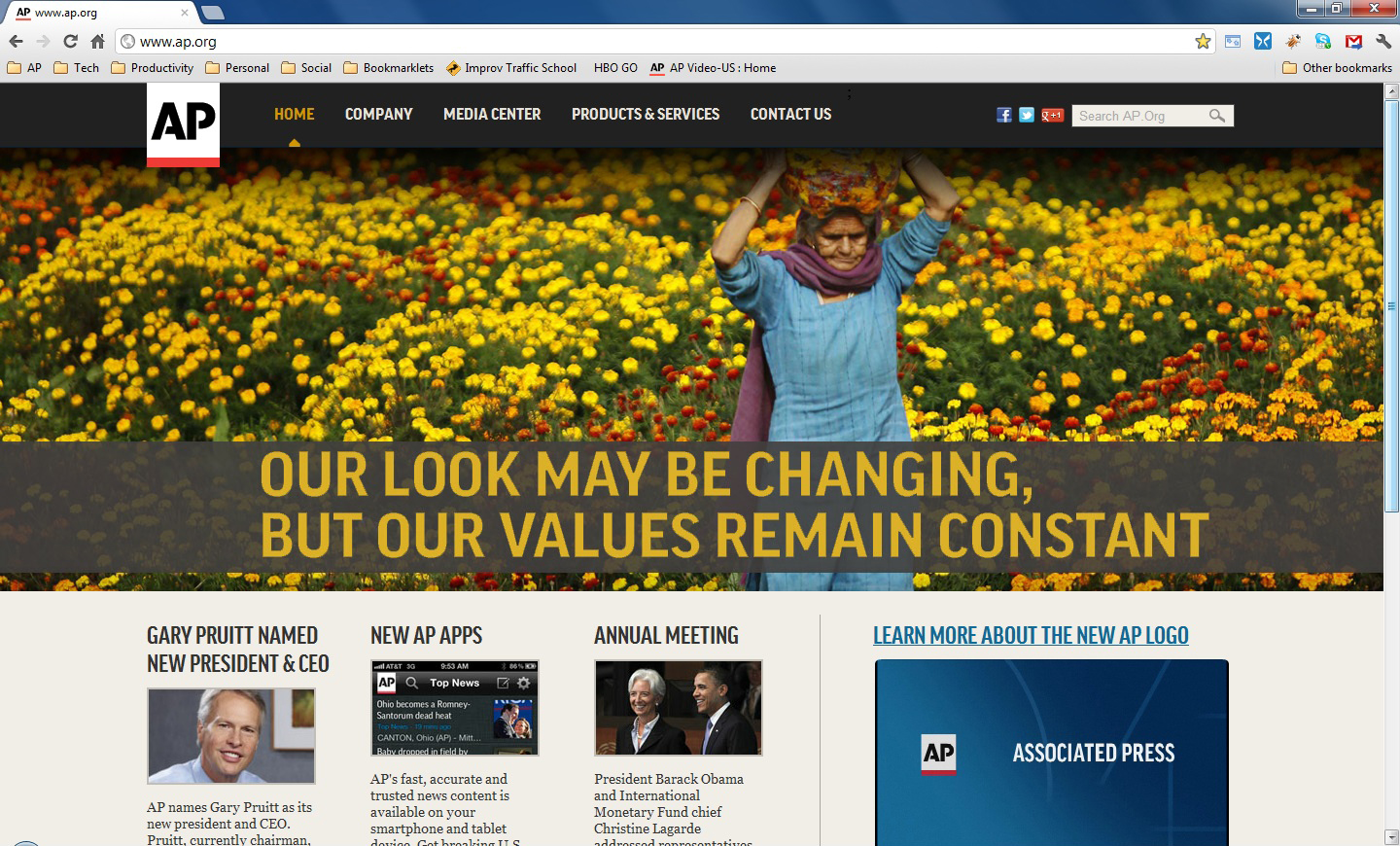
The Associated Press has launched their new home page web site at http://www.ap.org .  This site is the first launched with the new AP brand and logo, and was released with the new AP Mobile application for the iPhone, iPad, and iPod Touch.

It is also a site that has launched using a new technology platform we have been developing at the AP, using ASP.net MVC for the front end of the site, SDL Tridion as a CMS for page creation, FAST as the search index, and lots of jQuery.  Features baked into the site are the user-managed navigation, the 3 and 4 column components, carousel component on the home page and section front pages, standard articles and article index, automated sitemap.xml creation, SEO friendly pages, and the ability to publish new content without the involvement of Development staff.

Congratulations go out to Steve and Igor for the site development and design, Christine for being patient as we worked through the project, Dharamvir for finding all our bugs before we find them in production, and Mara for pulling us all together and keeping us focused.

AP Launches the Country Radio Music Widget

 From the AP web site:

The AP Country Music News Widget is the industry’s first real-time, fully-hosted web service “widget” focused exclusively on country music news and information. The Country Music Widget provides stories, images and video covering the latest in country entertainment news from album reviews to award winners. The Country Music Widget is branded for your station and website, and local advertisers can be inserted directly into the widget.

The product has been in beta from November 2010 and has finally launched today.  Congratulations to Steve, Madhu, Clark, Parendu, Keyur, Jen, Betsy, and Mike for a fine job on building and launching the new Widget platform, and its first product, the Country Radio Music Widget.

Read about the Country Radio Music Widget at these links:

iCircular Launches to Online Newspapers

iCircular 1.0iCircular is the mobile home to Sunday newspaper ads leading shoppers to great deals and savings at their favorite stores from their smartphone. This new product, created by The Associated Press, launched on September 19, 2011.  Congratulations go to the entire iCircular team for their hard work, dedication, and effort on this.  You have all done a great job!

You can read more about the launch and the products on the iCircular web site, and you can see some of the great press that the product is getting at the links below

Managing the boxes, and the space in between

As a leader, it is incumbent upon me to manage my team in every way. The word team has lots of different meanings for people. Some definitions require a team to be a temporary, project based group. Others do not make the distinction. I do not think it matters. In my mind, a team is a group of people who work together regularly for a common goal, and is not limited by time, space, or organizational boundary.

There are the five phases of development that teams go through, whether it is a short term assignment or a long term functional group. Those phases are Forming, Storming, Norming, Performing, and Adjourning.  Any change to that team “resets” the status quo, and sends the team through those phases again to some degree. This could be due to staff changes, a reorganization, attrition, major shifts in work assignments, or a host of other reasons. It is my job to guide my team through those phases of team development, and emerge on the other side as a better, stronger team.

Staffing changes are one of the most devastating changes to the team balance. Losing someone the team depends on in any way upsets the balance, changing the work and the way it is done for each individual member. Adding new players to the mix changes the political landscape, and a grab for power is only natural. A newly forming department is a chance to move up the organizational ladder. The team will be storming until a steady state is achieved.

Shifts in leadership give the team an entirely new tone, and this is driven not only by those at the top, but the relationships he or she fosters around him. How does the leader treat their team members? How well do they get along with partners outside the team? Does the leader delegate all phases of work, or are they in the trenches with their team, achieving their goals together? All this affects what people think about when commuting to the workplace.

Changes to the type and volume of work also disrupt team balance. A large project is a chance to prove yourself. New technologies are an opportunity to distinguish yourself apart from other developers. When too much work is assigned, team members struggle to balance out the overload evenly to minimize their personal stress levels.

My job is to manage each person on the team through these inflection points. Are there things that interest them that they are assigned to do? Are they challenged in their position enough, but not too much? Is there a planned career path? Are there defined ways for them to show success, and allowed to fail (with the ability to recover) for personal improvement? Do they enjoy coming into work every day?

Sometimes it is not managing the work in front of someone that is important, but the things around them. Are they finding ways to improve performance of themselves and those around them? How well does the team work with other teams? Are they disconnected, does the output of one team become the input of another, or is the process shared? Are meetings limited to the boundaries of your team? Are the successes shared across teams? Are the areas for improvement owned across teams as well? Are we measuring our work so that we can show success, improvement, and areas to work on next? Do you define your team as people only in your department, or has the definition of your “team” been broadened to include other teams you work with regularly?

These are the things that occupy my mind lately. Projects will constantly come and go. It is the team, it’s members, and how they work together that will make the work and it’s results better.

Touchdown! AP’s new College Football Site is live!

This post is long overdue, but is still significant.  The new Associated Press College Football Hub web site is now in production (As of August 21).  It  is stable, is recieving traffic, and the data is flowing.  This site is the new home of the AP Top 25 poll, which is updated each Sunday afternoon, along with th Harris Poll, the BCS Poll, and the USA Today Poll.  Youc an even submit your own version of the poll, if you think the sports wriers got it wrong!  You can see the site now at http://sports.ap.org/college-football .  You can also see the press release announcing the launch of the site at http://www.ap.org/pages/about/pressreleases/pr_082310a.html.

This site is a significant evolution of the Winter Games and World Cup site, integrating with our new Press Pass Registration Service, as well as major enhancements from the Content API to include college football data.  Some of the new technologies that are being implemented in this site include cufon (for font amangement), prototype and jQuery, WebTrends and Google Analytics, the WebPurify profanity filter service, as well as tight integration with Facebook and Twitter.

Check it out!  Let me know what you think!  Leave me some feedback!

Debugging Home Run – Problem Step Recorder in Windows 7

4E38RY7KZA4J

I just got an email about a really cool new tool built into Windows 7 that Microsoft used to debug their new platform. It is called Problem Step Recorder. The best thing to do is to post a snippet of the email right here. I think it says everything perfectly:

“In case you’re not aware of this, here is a little known Microsoft tool bundled with Windows 7 that can be extremely useful to illustrate a problem when testing an application. The diagnostic tool called “Problem Step Recorder” was originally produced by Microsoft during the development of Windows 7 Beta to assist their Quality Assurance team in debugging the OS. It uses a combination of screen captures with mouse tracking to record your actions and can be a great way of describing a problem to others. The program is launched from the Start menu by typing ‘psr’ or ‘psr.exe’ in the search field. You’ll get a floating applet that looks like this: When you hit the Record button, the applet tracks your mouse and keyboard input while taking screenshots that correspond to each new action. When you stop recording your session is saved to an HTML slide show that recreates your steps. It also allows you to add comments to further document the problem. I think it can be very useful as an attachment in [your bug tracking tool] for those hard to describe issues or as a “How To” document for end users.”

Which leads to other ways of doing this… you could youse WebEx or Windows Media Encoder to document any bug as a step-by-step. If you use WatiN, Selenium, or VS2010, you can also use their recorders to document any bugs you may find in a web application, hand that to the dev team, and then there is no guessing how to reproduce the bug.

Kudos to Microsoft, and to the folks who uncovered this!