Author Archives: Brian Whaley

Unknown's avatar

About Brian Whaley

Technologist, Digital Transformation Professional, User Experience Champion, Landscape & Macro Photographer, Avid World Traveler, Advanced Open Water Scuba Diver, Enthusiast of Home-Cooked Food

iCircular Launches to Online Newspapers

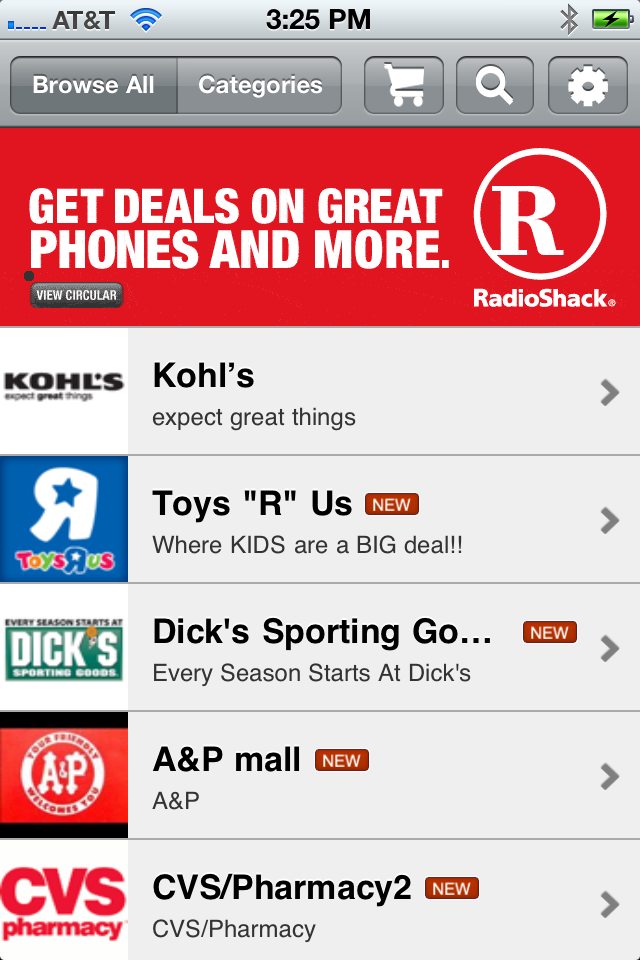
iCircular 1.0iCircular is the mobile home to Sunday newspaper ads leading shoppers to great deals and savings at their favorite stores from their smartphone. This new product, created by The Associated Press, launched on September 19, 2011.  Congratulations go to the entire iCircular team for their hard work, dedication, and effort on this.  You have all done a great job!

You can read more about the launch and the products on the iCircular web site, and you can see some of the great press that the product is getting at the links below

Managing the boxes, and the space in between

As a leader, it is incumbent upon me to manage my team in every way. The word team has lots of different meanings for people. Some definitions require a team to be a temporary, project based group. Others do not make the distinction. I do not think it matters. In my mind, a team is a group of people who work together regularly for a common goal, and is not limited by time, space, or organizational boundary.

There are the five phases of development that teams go through, whether it is a short term assignment or a long term functional group. Those phases are Forming, Storming, Norming, Performing, and Adjourning.  Any change to that team “resets” the status quo, and sends the team through those phases again to some degree. This could be due to staff changes, a reorganization, attrition, major shifts in work assignments, or a host of other reasons. It is my job to guide my team through those phases of team development, and emerge on the other side as a better, stronger team.

Staffing changes are one of the most devastating changes to the team balance. Losing someone the team depends on in any way upsets the balance, changing the work and the way it is done for each individual member. Adding new players to the mix changes the political landscape, and a grab for power is only natural. A newly forming department is a chance to move up the organizational ladder. The team will be storming until a steady state is achieved.

Shifts in leadership give the team an entirely new tone, and this is driven not only by those at the top, but the relationships he or she fosters around him. How does the leader treat their team members? How well do they get along with partners outside the team? Does the leader delegate all phases of work, or are they in the trenches with their team, achieving their goals together? All this affects what people think about when commuting to the workplace.

Changes to the type and volume of work also disrupt team balance. A large project is a chance to prove yourself. New technologies are an opportunity to distinguish yourself apart from other developers. When too much work is assigned, team members struggle to balance out the overload evenly to minimize their personal stress levels.

My job is to manage each person on the team through these inflection points. Are there things that interest them that they are assigned to do? Are they challenged in their position enough, but not too much? Is there a planned career path? Are there defined ways for them to show success, and allowed to fail (with the ability to recover) for personal improvement? Do they enjoy coming into work every day?

Sometimes it is not managing the work in front of someone that is important, but the things around them. Are they finding ways to improve performance of themselves and those around them? How well does the team work with other teams? Are they disconnected, does the output of one team become the input of another, or is the process shared? Are meetings limited to the boundaries of your team? Are the successes shared across teams? Are the areas for improvement owned across teams as well? Are we measuring our work so that we can show success, improvement, and areas to work on next? Do you define your team as people only in your department, or has the definition of your “team” been broadened to include other teams you work with regularly?

These are the things that occupy my mind lately. Projects will constantly come and go. It is the team, it’s members, and how they work together that will make the work and it’s results better.

Touchdown! AP’s new College Football Site is live!

This post is long overdue, but is still significant.  The new Associated Press College Football Hub web site is now in production (As of August 21).  It  is stable, is recieving traffic, and the data is flowing.  This site is the new home of the AP Top 25 poll, which is updated each Sunday afternoon, along with th Harris Poll, the BCS Poll, and the USA Today Poll.  Youc an even submit your own version of the poll, if you think the sports wriers got it wrong!  You can see the site now at http://sports.ap.org/college-football .  You can also see the press release announcing the launch of the site at http://www.ap.org/pages/about/pressreleases/pr_082310a.html.

This site is a significant evolution of the Winter Games and World Cup site, integrating with our new Press Pass Registration Service, as well as major enhancements from the Content API to include college football data.  Some of the new technologies that are being implemented in this site include cufon (for font amangement), prototype and jQuery, WebTrends and Google Analytics, the WebPurify profanity filter service, as well as tight integration with Facebook and Twitter.

Check it out!  Let me know what you think!  Leave me some feedback!

Debugging Home Run – Problem Step Recorder in Windows 7

4E38RY7KZA4J

I just got an email about a really cool new tool built into Windows 7 that Microsoft used to debug their new platform. It is called Problem Step Recorder. The best thing to do is to post a snippet of the email right here. I think it says everything perfectly:

“In case you’re not aware of this, here is a little known Microsoft tool bundled with Windows 7 that can be extremely useful to illustrate a problem when testing an application. The diagnostic tool called “Problem Step Recorder” was originally produced by Microsoft during the development of Windows 7 Beta to assist their Quality Assurance team in debugging the OS. It uses a combination of screen captures with mouse tracking to record your actions and can be a great way of describing a problem to others. The program is launched from the Start menu by typing ‘psr’ or ‘psr.exe’ in the search field. You’ll get a floating applet that looks like this: When you hit the Record button, the applet tracks your mouse and keyboard input while taking screenshots that correspond to each new action. When you stop recording your session is saved to an HTML slide show that recreates your steps. It also allows you to add comments to further document the problem. I think it can be very useful as an attachment in [your bug tracking tool] for those hard to describe issues or as a “How To” document for end users.”

Which leads to other ways of doing this… you could youse WebEx or Windows Media Encoder to document any bug as a step-by-step. If you use WatiN, Selenium, or VS2010, you can also use their recorders to document any bugs you may find in a web application, hand that to the dev team, and then there is no guessing how to reproduce the bug.

Kudos to Microsoft, and to the folks who uncovered this!

Blogroll – SEO, Web Analytics, Usability, Upcoming Conferences, and Other Interesting Stuff

These are just some of the articles I have read in Google Reader over the last month and a half that I have found interesting.  I thought maybe you would too…

SEO

Web Analytics

Usability

Upcoming Conferences

Other Interesting Stuff

Reflections from the Other Side of the Interview Table

Over the last 10 years, I have been involved with many, many interviews.  I have blogged about good interview booksresources for interviewinghow to prepare for an interview as the interviewer, and how to conduct an interview.  Being on the other side of the interview table is a bit different.  It definitely added some serious insight into how I conduct my interviews, and reinforced a lot of the process I have put in place.

There are different things to do before the interview,  to prepare for the interview itself, and to follow up with after the interview.  This is my brief step-by-step guide to navigate the interview process as an interviewee.  It seemed to be successful, as I have moved my cheese recently to the Associated Press!

Should you stay or should you go?

This is a big decision.  In this rough economy, having a job at all is a blessing.  But decide to leave a stable job for something else is risky.  But, with great risk comes great reward.  This move has been great for me mentally, personally, and professionally.  Here are a few sites that I used to help me decide to take the leap.

Preparing your resume

Your resume is your potential new boss’s first glimpse at who you are.  If you decide to make the leap and look for a new job, be sure that you spend the time to present yourself as best you can.  This is where the bulk of candidates will be cut from the running.  Make sure you stay on the short list with these resources.

Once your resume is just the way you want it, be sure to update your profiles on FacebookLinkedInDiceMonster, your Google Profile, or any of the other places where your work history might be stored online. Your new employer will check all of these, and consistency in you message and timeline is very important.

Where to look for a new tech job

Once your resume is all tidy, and your profiles are updated, now it’s time to start looking for that perfect new job.  Here are a couple of articles that will help you find that perfect new home.

One of my favorite places I liked to search for new jobs was indeed.com.  You could search across DiceMonsterCareerBuilder, and lots of Fortune 500 corporate career sites.  Personally, I created a search on each of these sites, and added the RSS feed from the search to Google Reader, and checked it each day.  This made job searching simpler, and centralized it for me all in one place.

Preparing for the interview

When preparing for the interview, you should anticipate the questions you are going to be asked.  you should expect technical, managerial, project management, style, and soft skills questions.  Here are a few books that I recommend to prepare for your interview questions:

Follow up afterwards

After the interview, you need to thank your interviewers and let them know that you are interested in the job.  Be sure to follow up with them after the interview.  Thank them for their time, build on some points or strengths discussed in the interview, and express your enthusiasm in the position.  There are lots of good sample thank you letters out there.  Be sure to customize it to your interviewer, the interview, and to you.

Research the salary band for the position

You are going to be talking about salary at some point with your potential new boss or HR department.  You need to be prepared.  Be sure to research the salary band for your title, position, region, and level of responsibility.  Salary.com is a great place to do this.

How to navigate the job offer

Job offers can be complex, confusing, and a very touchy situation.  This is very far along in the process, and you now know whether you want the job or not. Negotiations.com offers some good advice in negotiating your offer package.

Wrap Up

Overall, the objective of an interview is to get to know your new possible employer, and let them get to know you.  If you are a match for them, and they are a match for you, things will work out fine.  If not, then don’t be disheartened – you and your interviewing company were not a match for each other, and you are better off finding a job that will make everyone happy.  You move on to the next interview.  My piece of advice to find that perfect match is to be yourself, be honest, and be prepared.

My Cheese has moved…

There has been lots of change in my life lately.  For those that are not already in the know, I have taken a new position at The Associated Press.  This is a very exciting opportunity.  I am working for another company with a long and prestigious history, with a team of extremely smart developers and a sharp management team, and some very exciting technology.  You can read all about The Associated Press on the AP Web Site, or you can take a look at some of the new web sites I will be managing – AP Images, AP Exchange, AP Archive, the Winter Olympics Microsite (and more like this to come).  I will be working in the mobile space as well.  I am still getting a handle on the mobile landscape at the AP, but I already have the AP Mobile and AP Today in History applications on my Motorola Droid.  As you would expect, the AP has a large social media footprint.  You can follow AP, AssociatedPress, or AP_Images on Twitter.  There is an AssociatedPress channel on YoTube.  You can also join the Associated Press page on FaceBook.

I have also changed my blog’s home.  After much of the hemming and hawing, I have moved my blog onto my own domain, PixelatedViews.com.  There is not a lot of content on the main site, but more is on the way.  The new URL for my blog is http://www.pixelatedviews.com/blog.   I have changed the old FeedBurner feeds to point to the new ones, so you might have gotten 140 new posts from me in your feed reader.  Sorry about that.  I have also created two new FeedBurner feeds – Pixelated Views Blog and Pixelated Blog Comments.  I recommend following them.

So… that’s enough change for me for now.  If only it were always my choice…

Main Course – My Motorola Droid, With a Blogroll for Dessert!

Motorola Droid

So I have traded my Samsung i760 running Windows Mobile 6 for the Motorola Droid running Android 2.0.1 code named Eclair. I am loving this phone. It is just as good as (some even say better than) the iPhone. It is fast, comes with a speaker phone, a big screen, built in wifi, bluetooth, and GPS, is based on Linux, is all open source, and is a slider so I have a physical keyboard. The hardware, OS, and software are all very finger-friendly. The Android market doesn’t have as many apps as the iPhone yet, but there are still thousands to choose from and the number is growing every day.

My Favorite Apps

The first thing I did was to connect my Gmail account to my Android phone. I instantly got my Gmail, Google Calendar, and Contacts synced. Then I connected the email and calendar client to my Outlook account at work. I love how the Corporate Contacts app can look up people at work without any additional information.

Plantronics Voyager Pro

I also bought a new Plantronics Voyager Pro and hooked it up to my new phone.  What a great pair!  The bluetooth connection is great, the noise cancelling works awesome, the volume is excellent… i am so glad I bought this!

Blogroll

And here are some of the great articles that i have read recently on SEO, social media marketing, and user experience.

Mobile-izing an Existing Site

There has been a lot of talk amongst my clients lately on how to make our existing sites more mobile device compatible. We have done some brainstorming, and have come up with some ideas on how to do this.

Build a separate site

The simplest thing to do would be to do build a separate site for mobile users. Some simple user agent switching based on the user’s browser can take mobile phone users to the separate site. The new site can then be tailored for smaller screens, be less graphics intensive, and develop alternative solutions for Flash components.

Full Redesign of the existing site

Another possibility would be to build one site that has enough logic to manage multiple resolutions. This could be through multiple master pages, separate sets of images, JavaScript to display different image sizes, different CSS files, and a fluid CSS based layout without tables. This can be cumbersome and time-consuming, but may be a good approach long term. This will accommodate both large monitors on desktops, smaller resolutions on netbooks, and tiny resolutions on mobile phones.

Hybrid approach

One approach we are considering is a hybrid approach, combining the strengths of the first two approaches. If we have two domains with user agent switching, we can optimize each of the sites – one for mobile users and one for full browser users. Each site could have its own master page or template with its own separate set of images. We can reduce the work by tagging the reusable content with specific div or span labels, and reuse them on the mobile site.

Build a Mobile App instead

Building a separate mobile application for each of the major phone platforms would allow the development team to tailor the user experience to the individual phone. Delivery to the phones and advertising the mobile application may make the user base smaller. We would also need to develop across at least 4 different platforms – Android, iPhone, Windows Mobile, and Palm. There are multiple versions of the platform to manage, as well. The phones that use a custom platform would then miss out on the entire mobile experience.

Invest in a tool or 3rd party

There are lots of third party tools that can be used to help migrate or transform your site into a more mobile friendly experience. Some of the companies who develop and support these tools either have fully managed solutions or have a consulting services group that can be hired to help you through this process. There are also a lot of companies who say that they specialize in mobile-izing sites that you can contract with, and I am sure they are not cheap.

Do Nothing

The further technology advances, the more this option becomes really viable. The iPhone’s browser has multi-touch pinch-to-size technology, allowing you to zoom in and out of the HTML page. The Android is releasing this as well very soon, but in the interim has a zoom feature. Even the old Windows Mobile 6.0 phone I used to use had a custom browser with zoom technology for the pages it rendered. the more improvements in technology, the less developers will need to customize based on resolution.

What are your thoughts?

What are you or your team doing to break into the mobile arena? Do you prefer one of these solutions over another? Do you have another idea or approach you would use? What tools or 3rd parties are you using to mobile-ize your site? Leave your thoughts, ideas, or experiences here and share with others!

SEO Blogroll

I don’t usually do this, but with my recent trip to India, it might be a good idea to do a SEO blogroll post. I have found a number of interesting articles lately, and thought that I would share them with my team, particularly the developers in India. So, without further ado, here is an SEO blogroll from the last 3 months:

Whew! That was a lot of links! But the articles are really interesting, and pertain to my day-to-day job, and I thought some folks I work with would be really interested to read them too.
Let me know if I should do this more often, or if this is annoying and a waste of time. Leave me a message and let me know what you think of these articles!