Category Archives: Web Dev

Put Your Personal Touch on Digital Life: Creating Your Own Font!

Sometimes, it’s nice to step away from the hum-drum day-to-day work and inject a little bit of your own personality into the digital world. We spend so much time looking at screens, and using the same standard fonts can feel impersonal. I recently decided to do something a little different and create a font based on my own handwriting. The result is a unique, personal touch that I can use anywhere—a fun way to stand out from the crowd!

The journey began when I stumbled across the Calligraphr website. The concept was immediately appealing: turn my actual handwriting into a TrueType (.ttf) font. I created a font I call By The Way, a play on my initials (BTW), and captures my own casual, personal feel of a handwritten note. The process was incredibly simple: I first downloaded the template pages from the site, then carefully wrote each letter and symbol in the designated boxes. Once complete, I photographed the pages and uploaded them back to Calligraphr. Within minutes, the site processed my input and delivered the TrueType (.ttf) file. I was so excited that I ended up creating eight different versions: regular, bold, small caps, small caps bold, and each of those in a narrow width! I’ve been using it ever since in things like PowerPoint presentations and Word documents.

Using the font on my local computer was simple, but I recently wanted to use it on my website as well. For the web, I needed the modern .woff and .woff2 file formats to ensure maximum compatibility and fast loading times across all browsers. To handle this conversion, I turned to the FontSquirrel Webfont Generator. This free, incredibly helpful tool made the conversion process a breeze. All I had to do was upload my “By The Way” TrueType (.ttf) files to the generator. After selecting a few simple options, it quickly provided a downloadable kit containing the necessary .woff and .woff2 files, along with the required CSS, allowing me to finally use my custom handwriting font on my own website. You can see a sample of my “By The Way” font in action right here: https://www.pixelated.tech/bytheway.

Here’s a quick recap of the process I followed:

  • Discovered and visited the Calligraphr website.
  • Downloaded the custom font template.
  • Wrote all the characters in my own handwriting on the template.
  • Photographed and uploaded the completed template pages back to the site.
  • Downloaded the generated TrueType (.ttf) font file.
  • Used the FontSquirrel Webfont Generator to convert the .ttf file to web-ready .woff and .woff2 formats.
  • Installed the .ttf version locally and uploaded the web versions to my site.

The entire project—from the initial idea to seeing my own handwriting displayed on my website—was an absolute blast! It’s deeply satisfying to have a font that is truly mine and know that I created it with just a pen, paper, and a couple of great web tools. If you’re looking for a fun, creative project that results in something unique and useful, I highly recommend creating a font based on your own handwriting.

The Partnership Toolkit: Choosing Web Development Tools for Client Success and Ownership

In modern web development, the project doesn’t end when the code is deployed. The truly successful outcome is when the client is empowered to own, manage, and grow their new digital platform. Choosing the right tools isn’t just about developer preference; it’s about selecting a sustainable ecosystem that offers performance, scalability, and, most importantly, client manageability.

This post focuses on tools that provide excellent performance, are easy for the client to manage, and offer predictable, sustainable costs, minimizing the Total Cost of Ownership (TCO).


The Foundation: Developer Tools (Built for Speed)

These are the tools used behind the scenes, but their efficiency and power directly translate into lower development costs and higher performance for your site.

  • Integrated Development Environment (IDE): VSCode VSCode allows developers to work quickly and efficiently, using extensions and features that ensure clean, high-quality code. This efficiency is critical for reducing your total project and maintenance hours, ultimately saving you money. It is free for all developers.
  • Version Control: GitHub GitHub is essential for ensuring your codebase is secure, tracking all changes, and enabling safe collaboration. This minimizes the risk of errors and allows for faster, safer updates by any future development team. The core functionality is free/low cost for developers.
  • GitHub Copilot (within VSCode): This pairing transforms your IDE into an AI-powered co-pilot, offering real-time code suggestions and complex function completions right as you type. While a free tier is available, upgrading to the paid tier ($10/month for Pro) provides unlimited completions and access to premium models (like GPT-5 and Claude), with efficiency gains that studies show can reduce coding time by up to 55%. Crucially, you must still review all suggestions to ensure accuracy, but the time saved on boilerplate and repetitive tasks makes the paid subscription a wise investment for professional developers.
  • Frameworks: Next.js & Node.js These popular, open-source technologies are chosen because they deliver the fastest possible loading times, highest SEO performance scores, and an extremely large community of open source solutions and smart experienced developers. This speed and performance directly boost your user experience and search rankings. They carry no direct software cost.

Hosting & Infrastructure (Client Costs and Control)

Hosting is a critical, ongoing cost. We choose platforms that balance performance with clear, manageable pricing and client control.

  • Cloud Hosting: AWS AWS provides powerful, unlimited scalability and customization for complex or high-traffic sites, ensuring your platform can grow seamlessly with your business. This high power comes with a learning curve and the variable, pay-as-you-go cost structure requires careful management to remain cost-efficient, and pays for itself in management and automation savings.
  • Deployment/Management: AWS Amplify Amplify simplifies the complex hosting and deployment process within AWS, resulting in a reliable, fast setup and easier environment management. It is cost-efficient and scalable, with usage-based pricing that is highly affordable for static and serverless applications.
  • Domain Management: Route 53 Route 53 is a highly reliable DNS service that guarantees industry-leading speed for your domain lookups, minimizing downtime and seamlessly integrating with your AWS hosting. It has a very low cost, with nominal annual fees and tiny query fees.
  • Blog/CMS: WordPress WordPress offers maximum simplicity for content teams and a vast library of plugins, making it easy to find talent and add features without extensive custom development. It is extremely cost-effective for content-focused sites due to its user-friendly interface and wide host availability. It is a popular choice for full site development, but i find other solutions better, and leverage this for targeted solutions like blog content within a larger site.

Content & Media (Empowering the Client Team)

These tools maximize your team’s independence, allowing marketing and content staff to update the site without relying on a developer.

  • Headless CMS: Contentful Contentful provides a clean, API-first interface that gives your content editors control over content structure and entries without ever risking breaking the website’s layout. It is scalable, with a generous free tier for starting and paid plans based on usage metrics and number of users, and can grow predictably with your business.
  • Media CDN: Cloudinary Cloudinary automatically optimizes, formats, and serves all your images and videos, ensuring your site stays fast and compliant even as your content library grows. There is a free tier that is generous in features and caps, and if you go beyond those needs, the usage-based cost is often justified by the huge performance gains and reduced manual labor of image preparation.
  • General CDN: CloudFront (AWS) CloudFront speeds up your website globally by serving content from the closest location to your users, ensuring a consistently excellent experience for everyone. As a standard AWS service, it is a highly cost-effective, automated, and foundational element for high-performance delivery.
  • Image Hosting: Flickr Flickr is a simple, free way to share large volumes and collections of photos. For professional web development, it generally sacrifices the performance and control needed compared to dedicated CDNs. Its cost can be lowor free, but it’s not ideal for mission-critical website images. Combine the image management tools with a CDN like Cloudinary, and you have a powerful combination to manage image heavy web sites easily.

Marketing, Analytics & Business (Driving Client ROI)

These tools are essential for managing your business, tracking your success, and automating your operations, offering maximum value through control and direct ROI tracking.

  • Analytics: Google Analytics (GA4) GA4 provides the industry-standard data needed to understand user behavior, measure marketing effectiveness, and make confident, data-driven business decisions. It has zero direct cost, making it the essential choice for digital insights.
  • SEO Tools: Search Console, DevTools, Lighthouse, PageSpeed These free Google tools provide direct, authoritative feedback on how to improve your technical SEO, performance, and user experience, giving your team immediate, actionable insights. All are free.
  • CRM/Marketing: HubSpot HubSpot provides a seamless, all-in-one platform for sales, marketing, and customer service, simplifying training and ensuring your data is unified in a single dashboard. While the free CRM is excellent, the full-featured Hubs come with a high variable cost (expensive subscriptions), so this is best chosen when the user count is very low or very high, or the integrated suite is a business necessity.
  • Email Marketing: Brevo Brevo offers excellent email deliverability and powerful marketing automation features without the high cost of a full CRM suite, allowing you to scale your email volume affordably. Its pricing is competitive and predictable based on the number of emails sent.
  • Automation: Zapier Zapier allows your business to connect different software (like your CMS, CRM, and accounting) without custom coding, minimizing reliance on developers for simple workflow automations. Its free tier is very usable, and growing beyond that has a variable cost that is often justified by the significant TCO reduction it provides by replacing time consuming manual integration work.
  • Payments: PayPal PayPal offers a trusted, easy-to-integrate payment solution with instant brand recognition, increasing customer confidence at checkout. The cost is the standard transaction fees, which are competitive, and a predictable operational cost based on sales volume.
  • Financials: QuickBooks QuickBooks provides the leading small-business financial management software, ensuring easy integration with your bank and seamless expense/invoicing management. Its subscription cost is a core business operational expense.
  • Event Management: Eventbrite Eventbrite simplifies the entire process of hosting and selling tickets for events, providing a widely accepted platform for easy registration and attendee management. The cost is a fee structure, with service fees for paid events.

Conclusion: Building a Sustainable Ecosystem

The goal of modern web development is to deliver not just a functional website, but a sustainable business platform. By choosing tools like Contentful for content ownership, AWS Amplify for affordable hosting, and Zapier for automation, you empower your client to manage their site, control their costs, and scale their growth without being locked into expensive, developer-dependent solutions. This client-centric approach ensures long-term success for both your client and your partnership.

The Essential Guide to Web Accessibility for Small Businesses

Making your website accessible isn’t just a technical requirement—it’s a smart business decision that expands your reach and protects your brand. It’s about ensuring that everyone, regardless of ability, can perceive, understand, navigate, and interact with your digital content. For small businesses, this can unlock a significant, underserved market and enhance your overall user experience.


What is Web Accessibility

Web accessibility means that people with disabilities can equally use and interact with the web. This includes individuals with:

  • Visual impairments (blindness, low vision, color blindness)
  • Auditory impairments (deafness, hearing loss)
  • Physical or motor impairments (limited ability to use a mouse, need for keyboard navigation)
  • Cognitive or neurological impairments (learning disabilities, photosensitivity)

An accessible website is designed and coded so that assistive technologies—like screen readers, keyboard navigation, and voice command software—can accurately interpret and operate the site.


Why is it Important for Small Businesses

Ignoring web accessibility can limit your market, invite legal risk, and damage your brand reputation. For a small business, the benefits are clear:

  1. Expanded Market Reach: Globally, over one billion people live with some form of disability. By making your website accessible, you tap into this massive, often overlooked, consumer base and their significant spending power.
  2. Mitigation of Legal Risk: In many jurisdictions, including the US (under the Americans with Disabilities Act – ADA) and the EU (under the European Accessibility Act – EAA), websites are considered places of public accommodation and must be accessible. Non-compliance can lead to costly legal action, which can be devastating for a small business.
  3. Improved SEO: Many accessibility best practices—like proper use of headings, descriptive link text, and alternative text for images—overlap directly with Search Engine Optimization (SEO) best practices. An accessible site is often a more discoverable site.
  4. Better User Experience (UX): Accessibility improvements benefit everyone. Clearer navigation, better color contrast, and a focus on simplicity make your site easier to use for the elderly, people using mobile devices, or those in low-light conditions.

What Standards are There

The most widely recognized and globally adopted standard for web accessibility is the Web Content Accessibility Guidelines (WCAG), developed by the World Wide Web Consortium (W3C).

WCAG 2.2 Standards

The current stable version is WCAG 2.2. This standard is built on four core principles (often remembered by the acronym POUR):

  • Perceivable
  • Operable
  • Understandable
  • Robust

WCAG 2.2 defines three levels of conformance: A (lowest), AA (mid-range and most commonly required legally), and AAA (highest).

You can explore the full guidelines and success criteria on the official W3C website: Web Content Accessibility Guidelines (WCAG) 2.2.


What Testing Tools Can Be Used

While automated tools can’t catch every issue, they are an essential first step for quickly identifying common errors.

Automated Testing Tools

  • axe DevTools: Developed by Deque Systems, axe DevTools is one of the most reliable and popular tools. It’s available as a free browser extension that injects into the developer tools of Chrome, Firefox, and Edge to scan your page for accessibility issues.
  • WAVE (Web Accessibility Evaluation Tool): A free online tool and browser extension developed by WebAIM that provides visual feedback on the accessibility of your web page.
  • Accessibility Insights: A suite of open-source tools from Microsoft for web and Android.

Developer Tools for Prevention

Integrating accessibility testing into your development workflow is key.

  • axe DevTools Accessibility Linter: This tool allows you to check for accessibility issues directly in your code editor as you type, supporting frameworks like React, Vue, and Angular.
  • eslint for accessibility: Linting tools like eslint-plugin-jsx-a11y for React projects, integrate directly with your coding environment to enforce accessibility rules and prevent common mistakes before they even reach production.

Manual and User Testing

Automated tools only catch about 57% of WCAG issues. Manual testing and user testing with people with disabilities are critical for a truly accessible site. This includes testing with:

  • Keyboard-Only Navigation: Can you reach and operate every interactive element (links, buttons, forms) using just the Tab key and Enter/Space?
  • Screen Readers: Test the user experience with tools like NVDA (free for Windows) or VoiceOver (built into macOS/iOS).

What Resources Are Available to Me

You don’t have to tackle this alone. Several excellent, free resources are available to guide your efforts:

  • The A11y Project: This is a community-driven effort that provides plain-language documentation, helpful patterns, and practical implementation tips for common accessibility challenges. It’s a fantastic starting point for developers and designers.
  • W3C’s Web Accessibility Initiative (WAI): The source of the WCAG standards, this site offers extensive documentation, tutorials, and educational resources for all aspects of web accessibility.
  • WebAIM (Web Accessibility In Mind): Offers excellent articles, resources, and training, including the WAVE tool.

Next Steps

  1. Perform an Initial Automated Audit: Start by running a scan of your homepage and a few key internal pages (like a contact form or product page) using the free axe DevTools browser extension or the WAVE tool.
  2. Focus on Level AA Errors: Prioritize fixing the most impactful issues, especially those related to WCAG 2.2 Level AA conformance, which is the most common legal benchmark.
  3. Learn and Implement: Use resources like The A11y Project to understand how to fix the issues, starting with fundamentals like:
    • Adding descriptive alt text to all meaningful images.
    • Ensuring proper color contrast for all text.
    • Making sure your site is fully keyboard-navigable.

Summary

Web accessibility is a commitment to inclusion, compliance, and superior user experience. By embracing the standards set by the W3C’s WCAG 2.2 and leveraging tools like axe DevTools, your small business can reach a wider audience, enhance its brand image, and build a more robust, future-proof digital presence. It’s not a finish line, but an ongoing process that will yield tangible benefits for your business and your customers.

Are you ready to run your first automated accessibility scan on your website?

Webinar – Running a Small Business in a Digital World

A Free Webinar from Pixelated Technologies

Small businesses are the heart of our local communities — from the cafés and boutiques to the contractors and family-owned shops in every downtown. But even the most loyal customers start their journey online.

That’s why we’re hosting a free webinar, Running a Small Business in a Digital World, designed to help local business owners understand how to attract more customers, stand out online, and use technology to grow smarter.


Why Your Digital Presence Matters

More than 80% of customers research a business online before making a purchase or visiting in person. Your website, social media, and online reputation often form a customer’s first impression — and can make the difference between earning or losing their trust.

This webinar will walk through how small businesses can build a consistent, credible digital presence that attracts new customers and keeps them coming back.


Building the Foundation: Your Website

Your website is your digital storefront. We’ll cover what makes a great small business site — mobile-friendly design, clear calls to action, and content that tells your story. You’ll see how simple updates can make your site more effective and better reflect your brand.


Getting Found Online

Search Engine Optimization (SEO) isn’t just for big companies. We’ll explain how small businesses can show up in Google searches, maps, and “near me” results — with easy, actionable steps you can start using right away.


Connecting Through Social Media

Social media gives you a way to connect directly with your community. Learn how to post with purpose, share your story, and build engagement without spending hours every day managing accounts.


Creating Content That Works

From short videos to quick blog updates, content builds trust and shows what makes your business unique. We’ll show how to plan and share simple, authentic content that gets noticed — even on a small budget.


Using AI to Work Smarter

Based on our recent blog, How AI Can Help Small Businesses Thrive, we’ll share how AI tools can help you save time, improve marketing, and make data-driven decisions — without replacing the human touch that makes your business special.


Measuring What Matters

Finally, we’ll show you how to track what’s working — from website visits and social media insights to online reviews — so you can make smarter decisions and see your digital efforts pay off.


Join Us Live

We’ll end the session with a live Q&A where you can ask about your own business challenges and get personalized advice.


About Pixelated Technologies

At Pixelated Technologies, we help small businesses thrive in the digital age through accessible, affordable web design, SEO, and digital marketing services. Our goal is simple — to empower local businesses to grow online while staying true to who they are.

How AI Can Help Small Businesses Thrive

Artificial Intelligence (AI) has been making headlines across industries, but for small businesses it’s not just a buzzword — it’s a practical tool that can simplify tasks, boost productivity, and help you better connect with customers. In this post, we’ll explore what AI is, the different types of AI, what it’s doing well today, how small businesses can put it to work — without fear of being replaced — and how real‑world numbers show it works.


1. What is AI?

At its core, Artificial Intelligence refers to computer systems designed to perform tasks that normally require human intelligence. This can include recognizing patterns, understanding natural language, making decisions, or even predicting outcomes. Unlike traditional software that follows explicit rules, AI systems can learn from data and improve over time, giving small businesses powerful ways to work smarter, not harder. Gusto

Example for small businesses: A local café uses an AI‑powered scheduling tool that analyses customer foot‑traffic over the week and predicts peak and slow times — enabling the manager to schedule staff more effectively, reduce over‑staffing on slow days, and ensure coverage on busy days without manual spreadsheets.


2. What different types of AI are there?

AI comes in many forms, each suited for different tasks:

  • Reactive AI: These systems react to specific inputs but don’t retain memory.
  • Machine Learning (ML): ML algorithms learn patterns from data and make predictions.
  • Natural Language Processing (NLP): This allows machines to understand and generate human language — chatbots, automated writing assistants, etc.
  • Generative AI: Systems that can create new content (images, text, music) based on existing data.
  • Expert Systems: AI designed to mimic human decision‑making in specialized areas, such as diagnosing issues or recommending actions.
  • Robotics: Physical AI systems that automate manual or repetitive tasks (such as warehousing, manufacturing).
  • Agentic AI (Intelligent Agents): More advanced AI that can perform tasks autonomously over time, learning from feedback and taking actions.

Another useful classification: AI by capability (e.g., Narrow AI vs General AI) or by functionality (e.g., perception, cognition, decision‑making). business.com

Example for small businesses: A boutique e‑commerce shop uses a generative AI tool to produce product description text (Generative AI + NLP). Meanwhile, their accounting software uses ML to flag unusual expenses automatically (Machine Learning). And a small manufacturing firm uses a robotics arm (Robotics) for one repetitive assembly step, freeing up a worker for higher‑value tasks.


3. What is AI doing well today

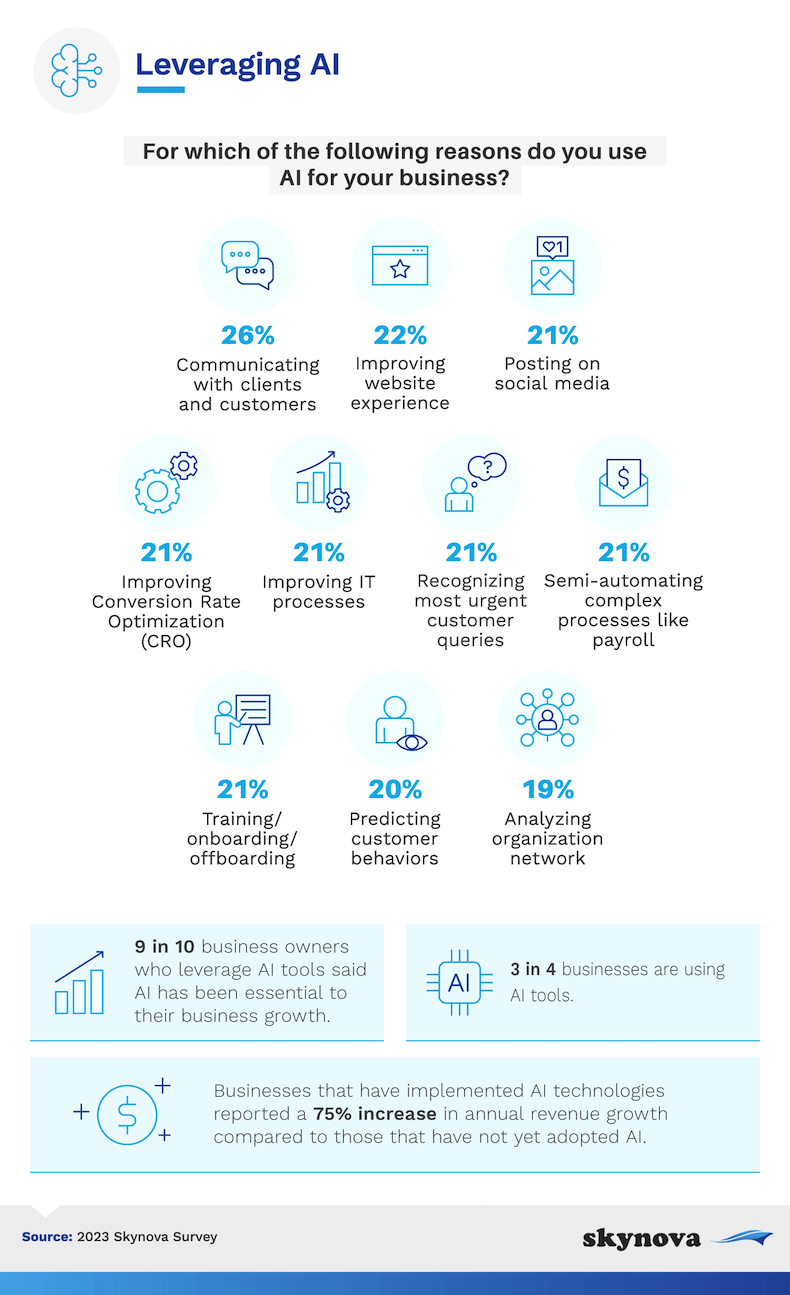
https://i.marketingprofs.com/assets/images/daily-chirp/230511-infographic-skynova-ai.jpg

AI excels at repetitive, time‑consuming, and data‑heavy tasks. Examples include:

  • Automating customer support through chatbots.
  • Analyzing data to find trends and insights.
  • Generating content like social media posts or product descriptions.
  • Predicting sales or inventory needs.
  • Personalizing marketing campaigns based on customer behavior.

Here are some compelling statistics illustrating how AI is already impacting small businesses:

  • 77% of small businesses that use AI reported increased efficiency. ZipDo
  • More than 40% of small business owners say GenAI users saw revenue grow by 20% or more. Gusto
  • 91% of SMEs using AI report revenue boosts, and 87% say it helps them scale operations faster than manual competitors. Sme Scale
  • Small business owners report savings of approximately $273.5 billion annually from time and cost savings enabled by AI tools. SBE Council

Example for small businesses: A local digital marketing agency uses an AI‑powered analytics dashboard that tracks both organic and paid channels; it automatically suggests which social posts are under‑performing and should be tweaked. This frees the agency owner from hours of spreadsheet work and lets them focus on strategy and client relationships.


4. AI as a Tool in the Toolbox

It’s important to remember: AI is a tool, not a replacement for humans. While it can automate certain tasks, it works best when combined with human judgment and expertise. Think of AI as a helper that handles the repetitive or time‑consuming parts of your work, leaving you free to focus on creativity, problem‑solving, and customer engagement. business.com

Example for small businesses: A small law‑firm employs an AI document‑review tool that identifies standard clauses and flags unusual ones. The lawyer still reviews and makes the final call — but the time spent on basic reviews is reduced from hours to minutes. The lawyer then uses that saved time to focus on strategy, client counseling, or more complex issues — not replaced, but freed for higher‑value work.


5. How AI Can Help Web Development

Small businesses can leverage AI in web development in several ways:

  • Website builders & templates: AI‑powered platforms that generate layouts, templates, and content suggestions (making launching a website faster).
  • User experience improvements: AI can analyze visitor behaviour (clicks, scrolls, bounce‑rates) to optimize navigation and design.
  • SEO optimisation: AI tools can suggest keywords, meta descriptions, content improvements to improve search rankings.
  • Automated testing & maintenance: AI can identify broken links, page errors, or design inconsistencies before they impact users.

Example for small businesses: A local real‑estate agent uses an AI website builder to launch their landing page. The platform uses a generative model to propose header text, image suggestions and layout. Then an analytics‑plugin uses ML to track which pages are getting clicks and suggests moving the “Contact Us” button to a more prominent location. The agent didn’t need extensive web‑dev skills or hire a full developer — AI accelerated and simplified the process.


6. How AI Can Help Social Media Marketing

Social media is another area where AI shines for small businesses:

  • Content generation: AI can create captions, posts, or even image suggestions (via generative models).
  • Scheduling & posting: AI tools determine the best times to post for maximum engagement based on historical data.
  • Analytics & insights: AI can track engagement, follower growth, sentiment, trending topics — helping you make data‑driven decisions.
  • Ad targeting & optimization: AI analyses user behavior to better target ads to the right audience, improving ROI.

Example for small businesses: A local bakery uses an AI‑driven social‑media assistant. It generates suggestions for daily posts (e.g., new flavor announcements, behind‑the‑scenes images), recommends optimal posting times for Instagram and Facebook, and provides weekly reports on which posts got the most engagement (and why). The bakery owner spends less time figuring out when/what to post and more time baking and interacting with customers in person.


7. Sum Up: AI Doesn’t Replace the Need for People

AI isn’t here to take over small businesses — it’s here to help them grow. From web development to social media marketing, AI can handle the repetitive, time‑consuming parts of your tasks, freeing you to focus on what matters most: your customers and your business vision.

With humans still at the centre — making the strategic decisions, bringing creativity, empathy, and domain knowledge — AI becomes a powerful tool in your toolbox that enables you to operate more efficiently, make smarter decisions, and deliver better experiences to your customers.

Example for small businesses: A small graphic‑design studio uses AI to generate first drafts of social‑media visuals and copy. The designer reviews, edits, and adds the creative/branding twist. The client still talks to the human designer, not just the AI. The human brings the nuance, storytelling, relationship, and brand understanding — while AI handles the heavy‑lifting of drafts and iterations.


Conclusion

In summary: AI doesn’t replace people — it enhances people. For small businesses, embracing AI means spending less time on the repetitive stuff and more time on the things that matter: strategy, relationships, creativity, human connection. Use AI as a smart assistant, not a substitute. Use it to make tasks easier, faster, and more efficient — while you lead the way.

Why Content Is So Important for Small Businesses

In today’s digital landscape, content is far more than just words on a webpage or a social-media post. For a small business, content is the engine that drives visibility, engagement, trust and growth. Whether it’s the articles on your website, posts on social media, or communications with customers, good content underpins nearly every facet of your marketing. Let’s break down why it’s so important — for your website, for your social media, for your customers and for your business as a whole.


On Your Website

Your website is your digital home base — you own it, you control it, and it’s where a large part of your customer journey happens. Content plays several crucial roles here:

1. Drives SEO (Search Engine Optimization).
Search engines like Google Search index content. The more high-quality, relevant, keyword-rich pages you publish (blog posts, guides, product/service pages), the greater your chances of being found by potential customers. One guide for small business SEO notes: “SEO … enhances online presence, drives organic traffic, and boosts brand credibility.” – Salesforce
And a stats piece shows businesses that blogs generate 55 % more visitors on average than those that don’t. – Digital Silk

2. Establishes authority and trust.
By regularly publishing content that answers questions your customers have, addresses their pain-points and reflects your expertise, you position your brand as a reliable source. According to the article “Why Content Marketing is STILL Important in 2025”, content “builds authority and trust in crowded, competitive markets.” – Exposure Ninja
When someone lands on your site and sees helpful articles or well-written service pages, they’re more likely to believe you know what you’re doing.

3. Provides a stable platform you own.
Unlike social media, where algorithms change, platforms fluctuate and your reach may vary, your website is yours. Your messaging, user experience, design and content are under your control. This content marketing article states that content “fuels everything else”, and that your website is the hub. – BrandWell
That means when you invest in good content on your website, you’re building an asset, not just a temporary post.

4. Boosts conversions.
Content on your website isn’t just about attracting traffic; it’s about guiding a visitor toward doing something — whether that’s making a purchase, filling out a form, signing up for a newsletter. A product-oriented blog, a case study, a clear service description or a FAQ page all help move someone from browsing to action.

Summing up: On your website, content is the foundation. Without it you’re basically invisible to search engines, harder for people to trust, and you have no stable home for your brand.


On Social Media

Social media isn’t just an add-on: it’s a dynamic way to connect, amplify your message and drive people back to your website. Here’s how content works there.

1. Engages your audience.
On platforms like Instagram, TikTok, LinkedIn or Facebook, content is the currency. You engage followers through posts that inform, entertain, inspire or solve problems. Engagement (comments, shares, likes) helps build a community around your brand. This article states small business social media efforts benefit from authentic content rather than just ads. – business.com

2. Increases brand awareness.
Your audience on social media might be much larger (or at least different) than your direct website traffic. Regular content helps your brand stay in front of people, grow your audience, and reach new prospects. Statistics show 83 % of marketers believe content marketing helps build brand awareness. – Digital Silk
For a small business this is crucial — you don’t just want to reach those already looking for you; you want to show up where they might not yet know you.

3. Drives website traffic.
Social posts often serve as a funnel into your website. A post with a link to a blog article or a special offer directs people from social platforms to your owned web property, where you can engage them further and convert them. One benefit list emphasises this point. – Studio Barn Creative

4. Tailors the message to platform.
Each social platform has its own style, format and audience expectation. For example:

  • Instagram or TikTok often favor visual/short-form content.
  • Google Business, Nextdoor, and Yelp, are designed to research products and services (electricians, restaurants, roofers) and gather opinions and ratings from customers, neighbors, and consumers.
  • LinkedIn may suit longer form posts or professional insights.
    Recognizing that and tailoring your content accordingly makes it work harder. A 2025 content marketing article highlights the importance of matching format and platform. BrandWell

Summing up: On social media, content connects you with people where they spend time, builds your brand, engages them and brings them into your website ecosystem.


For Your Customers

Content matters for your customers as much as for you. Here’s why.

  • Gives value and builds relationships. Customers are more likely to stick with brands that don’t just sell, but help. When you produce useful, helpful, relevant content, you nurture relationships—not just transactions. As one source puts it: content “helps brands build relationships and trust with their potential customers and existing customers at scale.” – Copyblogger
  • Educates and solves problems. Many customers are in the “I have a question” or “I need a solution” mode rather than “I want to buy now.” Good content helps answer their questions, show how you handle their pain points, and guide them. This builds goodwill and positions your business as helpful and credible.
  • Retains customers and loyalty. You don’t stop at the sale. Ongoing content for existing customers—like tips, updates, user generated stories or behind-the-scenes—helps maintain engagement. This small-business article noted content marketing helps nurture subscribers, audience members and leads. – Data Axle USA
  • Enhances the experience. Customers expect more than product listings; they expect story, authenticity, community. Content can address that expectation. In the social-media context, users appreciate seeing behind-the-scenes, real people, real stories: trust grows. – business.com

Summing up: when you create content with your customers in mind, you’re not just broadcasting; you’re building a relationship by giving them something valuable, trustworthy and memorable.


For Your Business

Finally, beyond website, social media and customers, content is vital for your business operations and strategy.

  • Supports every other marketing channel. Content is the fuel. Email campaigns need newsletter content; paid ads often direct to content; social media posts need something to link to. This article states: “Think of content marketing as the engine that powers everything else.” – BrandWell
  • Cost-effective, long-term asset. Content may take time and effort up front, but once published it can continue to drive traffic, engagement and conversions for months or years. Exposure Ninja notes that a “well-optimized blog post” keeps working. – Exposure Ninja For small businesses especially — competing with limited budgets — content is a strong lever. – Semrush
  • Builds competitive advantage. With good content you can stand out, especially in markets where your competitors are relying solely on ads or look-alike branding. Small business content-marketing guides say creating educational or unique-viewpoint content is a way to compete against larger firms. – Semrush
  • Drives measurable outcomes. As you build content, you can measure views, engagement, leads, conversions. Over time you can refine it, build authority, improve SEO, increase traffic and grow your business. Recent statistics show content marketing budgets are increasing and performance metrics such as traffic growth are improving. – Siege Media

So for your business, content is not optional — it is integral. It plays across your website ecosystem, your social presence, your email list, your ads, your branding, your customer lifecycle.


Putting It All Together

If you combine all of the above, here are a few actionable take-aways for a small business:

  • Treat your website as a content hub. Make sure you regularly publish relevant, quality content (blogs, guides, FAQs, case studies).
  • Use social platforms not just to broadcast your offers but to share content that drives traffic back to that hub.
  • Tailor your content format and message by platform (visual posts for Instagram/TikTok, informative posts for LinkedIn, etc).
  • Always ask: what problem is this content solving for my customer? How is this building trust?
  • Remember: content is a long game — consistency matters more than instant results.
  • Measure: which types of content are getting traffic, engagement, leads? Double down on what works.
  • Because your website is your own platform, invest in it. Social platforms help amplify, but your site is the place you control.

Why Now Is the Time

Recent trends show content marketing is more important than ever — and more strategic. According to one article: “If done right, a content marketing strategy in 2025 will help brands grow smarter, rank higher, and convert faster.” – Exposure Ninja
Another shows content marketing gives small businesses a way to compete against larger budgets. – Semrush
Moreover, the statistics bear it out: 83 % of marketers say content marketing helps build brand awareness, 74 % say it helps demand generation, 62 % say it nurtures leads. – Data Axle USA
And nearly half of marketers plan to increase content-marketing budgets in 2025. – Taboola

For small businesses that act now, that means gaining an advantage while others may still treat content as an afterthought.


Final Thoughts

Content is the connective tissue between your website, your social presence, your customers and your overall business strategy. Without it, you’ll struggle to be found, struggle to build trust, struggle to engage and convert. But with it—and done thoughtfully—you build visibility, credibility, relationships and revenue.

Graduation is Over… What Next?

Recently, I was a speaker at an event at a local Bootcamp.  The cohort I spoke to was focusing on front end development.  They had other speakers, all focusing on technology topics.  I thought I would change it up, and spoke about the hiring process – what a company is looking for, what you are looking for in a company, and how to find a good match.  The topic was very different for the cohort, and they were very interested.  I got lots of questions after the session, and even for weeks after, and have stayed in touch with many of the students.  Most of them have been placed.  The ones that did not, had one universal question – “What do I do next?”  Here is a quick review of what I covered in my talk – 1) what are you looking for in a new job, 2) what are you looking for in an employer, 3) remember why people leave, and 4) what a good company looks for in a new employee.  Then I dive into next steps – 1) introspection, 2) search for companies, 3) search for jobs, 4) apply, apply, apply, 5) prepare like it’s your final exam, and 6) follow up.

Am I A Match – A Quick Review

What are You Looking For in a New Job?

Everybody is looking for a great job… but what does that mean to you?  A big salary?  More responsibilities?  Working with a new skillset or the newest, best technology?  Or is it cool projects that are in the public eye?  Maybe it is working for big brands or large Fortune 500 companies.  Knowing what it is in a job that excites and motivates you is important.  There is no right answer.  But there is more to it than just that…

What are You Looking For in an Employer?

For me, I take pride in the work I do.  There is lots more to a job than the roles and responsibilities.  Part of that is where I work, the product I am a part of, what my employer stands for, how we give back.  Some other things that matter to me are the work itself, my future career growth at the company, opportunities for continuing my education, the cultures and behaviors embraced, work life balance, management support, and employee empowerment.  You have heard the phrase before – “Do what you love and you never work a day in your life.”

Remember Why People Leave

It is important to know why people leave their current job… you should focus on these for your new company, or you wont be any happier than you are now.  This is based on this article.  People leave their current job because of 1) a lack of trust, respect, or autonomy, 2) not being appreciated or recognized, 3) a lack of opportunities, challenges, growth, or development, 4) they are underutilized, 5) that have a bad manager or poor upper management, 6) they are overworked, stressed, or a poor work life balance, 7) a toxic, negative, unfocused culture or coworkers, and 8) you don’t have the room to breathe, do things your way, or try new things without blame.

What a Good Company Looks For  in a New Employee

I have been a hiring manager for a long time.  Each company I have worked for has their own strategy for hiring.  Smaller companies have looked at the short game – hire what we need to deliver our current projects – skillset, smarts, speed.  Larger companies keep their sights on the long term vision.  My current mantra is “raise the bar” – hire people that are better than our current pool of developers.  Someone the team can learn from and grow as a group.  When evaluating candidates, I look for 1) experience and current skills, 2) are they a technologist or just a coder, 3) is there a culture fit, 4) are they a disruptor – will they come in , question the status quo, ask questions, and improve our current environment, an 5) are they an innovator, staying on top of new technology, trying new things, and have an arsenal of tools for new situations.

Next Steps

Introspection

Now is the time to decide what it is that you are looking for – in a position, in a company, and in your career.  Short term, long term, needs and wants, for you and your family.  Make a list of what you are looking for, and list them in priority order.  You will need this to evaluate your happiness and fit.  Once you have an offer in hand is way too late.

Search For Companies

Once you know what you are looking for, you can find companies that match.  Do your own research.  There are a lot of resources to use in your search.  The ones I like are Glassdoor, LinkedIn, Indeed, and Google News.  You can also look at the research that someone else has done.  This may or may not be a good fit for you, so take these with a grain of salt – Fortune 500 list, Fortune Best 100 Companies, GlassDoor Best Places To Work, Forbes World’s Best Employers or Forbes America’s Best Employers, and LinkedIn Top Companies List.  I am sure there are many other lists that may be important to you – best companies for families, best companies for women, best companies for innovation, and many others.  The point is, do your research, and make a list.

Search For Jobs

Now that you know what you are looking for, and you know what companies fit your criteria, you can start to look for job opportunities that match.  I like to use LinkedIn and Indeed, but you can use Dice, or Monster, or any other job board.  I recommend completing the profiles or online resumes for each of the job boards you use, as this will help them find you a matching position.  You can also look directly on the web sites of the companies you prefer, but this will take longer, and most job boards scrape them all anyway.  Sometimes you will come across a great job opportunity that is not for the companies you have researched already.  Be sure you find out more about them, to see if they fit what your expectations are.  If they do, that is great!  If they don’t, then start a list of companies you are not interested in, and do not apply.

Something else that you can do is reach out to some of the large consulting companies and staffing agencies for a job.  if this fits the kind of work you are looking for, this can be a great way to get variety, exposure, and experience.  Some of the larger consulting companies I have worked with in the New York Area are Accenture, Deloitte, PwC, EY, KPMG, Bain, Cognizant, and more.  There are also staffing and placement firms, like McKinsey, Harvey Nash, Spencer Stewart, TEKSystems, Matlen Silver, and many others.  Reach out, meet with them, and let them help you find a great position.  They work with their account companies to get a percentage cut, so they will make out by placing you at a great gig.

Something you should not discount is networking to find a position.  There are networking events where you can meet other professionals in your area.  You can also go to tech meetups or local user groups to not only keep your skills sharp, but meet new people and hear about open positions.  And don’t be afraid to use your existing contacts to get references inside their companies, or make additional connections to other influential people who might have a job, too.  Remember the game “Seven Degrees of Kevin Bacon”?  Time to play “Seven Degrees of Job Offers”.

Apply, Apply, Apply

Time for you to apply to all those jobs that were a match.  Use your profile to automatically apply, or if that doesn’t work, complete the application manually.  Customize your cover letter and polish your resume to the position, as much as possible.  Do your best to address the cover letter to the recruiter or hiring manager.  Make sure you read up on how to write a resume – be results focused, use active tense verbs, keep it to a page or two, and make it easily readable by ATS software with tools like jobscan.co .  Your mileage will vary, depending on the level of the position, demand in the market, connection to your network, and countless uncontrollable factors.  Do not be discouraged.  You will most probably complete 10 to 20 applications to get an interview, and complete 10 interviews to get an offer.  But stay diligent, and those offers will roll in.  And now that you have identified what is most important, you should use a rubric to compare each offer to each other, and to what is most important to you.

Prepare Like It’s Your Final Exam

You have been scheduled for an interview.  It could be a discussion with HR, or an over-the-phone interview, or an on-site in-person interview.  This is your chance.  You have to be prepared.  Get a good night’s sleep, be sure to eat beforehand, bring copies of your resume, dress for success, and be positive.  But there is more to it than that.

Research the company – size, market cap, products, history, culture, reputation, competitors, strengths, weaknesses.  Know the job description.  Do mock interviews. Practice the tech, situational, and culture questions.  Have some situational stories from your experience ready in your mind to answer questions  And remember – this interview is two-way.  While you are there to be interviewed, you are also interviewing them.  Look for the good signs, and the red flags.  And come with a list of questions, focused on what is important to you.  I would also come to the interview with the questions written out, practice asking them, don’t shy away from the tough ones, and list them in priority order.  If you run out of time, you asked the most important ones.

Follow Up

did you submit your resume, and didn’t hear back?  Did you talk on the phone, but no on-site?  Idd you go to an on-site interview, but have not gotten an offer?  Don’t be afraid to follow up.  Don’t bombard them, but don’t shy away from finding out where they are in the process.  Ask for feedback all along the way – you will constantly learn and improve yourself.  And don’t be hard on yourself if it doesn’t work out.  Rejection is tough.  But finding out now that you and the company are not a match is loads better than finding out after you have accepted an offer, started the job, and have not been set up for success. Stick with it, and you will find the right company and the right job for you.

Conclusion

This is the basic routine I followed when I was on the hunt for a new job.  Research the companies I liked; find the jobs I thought I fit; apply, apply, apply; prepare for the big day, follow up, and be positive throughout the process.

I am sure there are details I have missed out.  What else do you recommend?  Leave a comment and let me know.

400 Level Testing – 20 Advanced Topics

Now that we have walked through the basics in my posts on Testing 101, 200 Level, and 300 Level testing, the number of bugs in your production environment should be falling. To continue to eliminate the nasty bugs, it is time to dig deep, get creative, and use skills from other fields. Here are some out-of-the-box ideas to continue the momentum and focus on quality and stability of your software products.

  1. Shift Left – this is the general principle to find bugs as soon as possible in the software development process – write automation tests to find bugs in QA, write unit tests to find bugs in development, use TDD to find bugs before you write code, architect testability into your platform before you even create the solution.  TechBeacon has a great article about Shift Left.
  2. Crowdsource Testing – sometimes you need to get a fresh, new perspective on testing.  Using the general public can help you get there.  I have used a  company called uTest, and they were great.  They have all kinds of purchase options.  There are lots of other crowdsource testing companies to choose from.
  3. Fuzzing – I have done this before and never knew it was called fuzzing.  Build automation tests that randomly generate characters (ISO-8859-1 and UTF-8) and submit forms, to test positive and negative cases you never thought of.  Run it thousands of times, and you are bound to find some errors.  Read F-Secure to learn more about fuzzing.
  4. Innovation – When most people think of innovation, they think of a bolt of lightning, striking randomly. While this may be true some of the time, that isn’t always the case. There are methods to developing and trying new ideas, and that kind of innovation needs a culture to support it. This great article from The Medium outlines some of the methodologies to use to find innovation.
  5. Design Thinking – Over the last few years, I have been working with Rutgers on their Advisory Board for their Design Thinking certificate program. I stay on top of the subject, and tweet a lot of great articles to read on the topic. When I came across this article on DT and Software Quality, I knew I needed to share it.
  6. Bug Bash / Bug Hunt / Bug Day – Make finding bugs a social event. Invite your team, or other teams, to find bugs in your product. Set aside an afternoon, order some pizza, plan some prizes, and find some bugs! Read more about how to run a Bug Hunt.
  7. Quality Hackathon – another way to generate ideas about new approaches to testing and quality, you could hold a hackathon, one that focuses specifically on testing. Are there new ways to automate? New tools to try? New approaches to testing? Challenge your team, set some parameters, pick some judges, give away some prizes, and make it fun!
  8. Apply Gamification to Testing – In World of Warcraft, there are monsters to kill, skills to learn, reputation to gain, equipment to discover.  You can do the same thing with Quality and Gamification – each person on the team has a QE Score, and gets points for bugs found, classes taken, Tech Talks conducted, junior teammates mentored.   Define a reward system, how to grow, and publicly praise the growth – different levels, badges, and achievements to earn and the steps to get there.  Read more about gamification on CIO.com.
  9. Machine Learning and Testing – Can we teach a machine to find bugs in software that humans write? Or identify what sections of our software systems will most likely have the most bugs? Or what sections of code are the most complex? Maybe we should give it a shot
  10. Measure your Test Maturity – According to CIO Magazine, “The Capability Maturity Model Integration (CMMI) is a process and behavioral model that helps organizations streamline process improvement and encourage productive, efficient behaviors that decrease risks in software, product and service development.” Initially developed by the Software Engineering Institute at Carnegie Mellon University, in conjunction with the DoD and U.S. Government, CMMI is currently administered by the CMMI Institute as a process improvement tool for projects, divisions or organizations. CMM defines 5 levels of maturity – (1) Initial, (2) Repeatable, (3) Defined, (4) Managed, and (5) Optimizing. If thought of in a different way, this maturity model could be specifically applied to software quality and testing, and used to measure current state and set goals for improvement.
  11. Think Different – While this may be the slogan for a famous ad campaign for a large tech company named after Newton’s fruit, it is also a technique to help people solve problems by taking a different mental approach – Creative, Analytical, Critical. Concrete, Abstract, Divergent, Convergent, Sequential, and Holistic thinking.  Read more about software testing and different thinking types on testingexcellence.com.
  12. Complexity = Errors – Exploit the correlation between complexity and errors. A rule of thumb is that one component should do one thing, and do it well. Make complex classes smaller. Break monolithic services into micro services. Break database tables into multiple, smaller tables. The same is also true for tests. Make unit tests smaller. Test smaller sections of the user journey. And aim your spotlight of testing onto complex areas of your application – UI, services, or data, integration points, service signatures, common failure points.
  13. Wear different Thinking Caps – It’s a common enough expression… “put on your thinking cap.” The 1985 book Six Thinking Hats by Edward de Bono promotes multi-dimensional thinking by mapping different colored hats to different cognitive styles – blue for an overview, white for facts, red for emotion, yellow for optimism, black for risks, green for creativity. Put on different thinking caps, and innovate in whole new ways.
  14. World Quality Report – “The World Quality Report is the only global report analyzing software testing and quality engineering trends. It presents an analysis of developments in agile and DevOps, artificial intelligence, automation, test environments, data, security and budgets, showing once again the importance of quality, and of the measures that are put in place to maintain it.” – sogeti (part of capgemini)
  15. Online Resources – Things change, evolve, improve. It is our obligation as technologists to stay on top of those changes. There are a lot of resources that can help you do that. Training, conferences, certifications, and industry trends are some ways to stay on top of those changes. Sometimes it is just staying on tho of the news as it happens. While doing research for my blog posts, some of the best resources for me were Ministry of Testing, Software Testing Help, StickyMinds, InfoWorld, and Software Testing Magazine.
  16. Training – Continuing your education as a technologist and quality engineer is critical. There are lots of online video training resources available online. Pick your favorite and keep learning. Two of my favorite are Udemy (and their class on Software Testing and Innovation): and Lynda (and their class on Exploratory Testing).
  17. Conferences – Learn about new techniques, hear from industry experts, plan for future innovation, look at products from vendors, continue your education. Check out a list of conferences from TechBeacon and testingconferences.org .
  18. Certifications – Certifications are more than just a test and a score. They are managed by a company with resources, continuing education, advanced certifications, and a community of professionals you can tap into. Check out a list of certifications for Software Testing professionals.
  19. Industry Trends – Remain on top of industry trends allows you to adapt to current challenges, leverage new tools and techniques, and benefit your skills and your company. Read more about quality assurance trends in 2019.
  20. Beyond The Bugs – What I have focused on in these last four posts is how to find bugs in your code. Ones that would functionally prevent users from using your site. But there are lots of non-functional ways to test your site. Security testing, penetration testing, performance testing, reliability testing, efficiency testing, maintainability testing, portability testing.. and plenty more I am sure. Keep on expanding your knowledge, wide and deep.

In the list above, I just scratch the surface on each one of these ideas. Spend time researching each of them, dig deeper into the ideas, or come up with your own. Have an idea, technique, or best practice I haven’t covered? Leave me some comments and let me know.

300 Level Testing – Test Case Design Techniques

Leveraging a process is the basis to defining and executing a test strategy.  This allows the development team to focus on repeatability, stability, speed, and results.  While researching the landscape of test design techniques, I came across three very good articles that outline a clearly defined set of test design strategies (articles from Invensis, Art of Testing, and Test Automation Resources).  These articles outline techniques based on static code and compiled dynamic code; manual and automated testing; black box, white box, and experience based testing.  Below is a breakdown of each of the test design techniques.  Some of these have been discussed in my articles on Testing 101 and 200 Level Testing.  Below is a summary of each, but follow up with each of the original articles to get more details, as well as examples.

Static Test Design Techniques

Manual

  • Walk through – a formal step by step review of all the features and documentation by the authors to better understand the software.
  • Informal review – as stated, these are more informal discussions to gather information without the documentation or code.
  • Technical review – more of a peer review of the application.
  • Audit – a formal review comparing code to documentation by an external source.
  • Inspection – a formal review by trained moderators, documenting defects in code and documentation through a detailed process.
  • Management review – a review of the project documents – project plan, budget, metrics, objectives and results, etc.

With Help of Tools

  • Analysis of coding standards (using compiler) – comparing the code against a set of rules, conventions, and standards defined within a tool or document.
  • Analysis of code metrics – analysis of things like cyclomatic numbers, complexity, nesting, lines of code, code coverage, etc.
  • Analysis of code structure – an analysis of the application by following the flow of data or paths through the code.  Also analyzes the structure of the data and the code itself.

Dynamic Test Design Techniques

Specification-based or Black-Box techniques

  • Boundary Value Analysis – test all field input values at the boundaries – highest, lowest, etc.
  • Decision Table Testing – Also called Classification Tree Method, build a decision tree for the logic of the application, and write tests for each of them.
  • State Transition Diagrams – test each of the states of the application, particularly workflow steps.
  • Equivalence Partitioning – reduce your number of tests by determining ones that test the same thing, and return the same results.
  • Use Case Testing – define scenarios based on business functionality or user functionality.
  • Combinatorial Testing – Randomly selected values, all possible values, each choice in at least one test, all-pairs or pair-wise or n-wise combinations, etc.

Structure-based or White-Box techniques

  • Statement Coverage or Line Coverage – similar t code metrics, analyzing the amount of code that has been exercised by tests.
  • Condition Coverage or Predicate Coverage – all conditions (i.e. true or false) are tested.
  • Decision Coverage or Branch Coverage – all conditions in each decision table are tested.
  • Multiple Condition Coverage – all values in all conditions are tested.

Experience-based techniques

  • Exploratory Testing – similar to an informal review, this testing is based on a general understanding of the application, product, domain, company, etc. and the experience and intuition of the tester.
  • Error Guessing or Fault Attack – leveraging prior experience and expertise, guess where the cracks are in the application, and focusing the testing there.

How to Choose the Right Technique

Once you have a general understanding of test design techniques, choosing the right approach is the most critical next step.  Here are some of the decision points to pick the right one:

  • Application Typebased on requirements for the domain as well as  mobile vs. web applications.
  • Regulatory standardsmust follow conventional rules based on IT, countries, government agencies, etc.
  • Customer’s requirements– based on relationships or contracts with customers.
  • Risk Level and TypeThis includes business risk, legal risk, compliance risk, brand risk, etc.
  • Objectives – Focus on the objectives of your testing.
  • Test Expertise – knowledge of the application, availability of documentation, familiarity with the techniques, etc.
  • Time and budget – What will provide the biggest value that fits your schedule.
  • SDLCWaterfall, Agile, Scrum, Kanban, Extreme… each affects which technique will fit.
  • Defect History – What kind of bugs have you found already for this app, in other apps, across the domain, etc.

200 Level Testing – 15 More Things To Do When There Are Still Bugs

All developers know that they need to test their code.  What new developers don’t understand is that the longer a bug exists in their code throughout the software developer lifecycle, the more expensive it costs to fix it.  So what do you do?  You start with the basic techniques I discussed in my last post. But that is not the end, only the beginning of the quality journey. Your next step is to bake Quality into your process, whether it is waterfall, agile, kanban, lean, etc.  You think about quality in every stage.  See some examples below of how to include testing throughout each phase of your software development process.

  1. Architectural Design – Plan your solution out before you write your code.  This includes how you will test your application.  Sometimes this means writing your functions or methods differently, or creating some test harness code.  Plan this out beforehand.
  2. Code Standards, Conventions, and Style Guides – Set the standards with the team, making code easier to read, modify, test, and predict.  Do you want to follow certain naming conventions?  Are you a fan of Hungarian Style?  Particular about indenting? Does bracket placement matter?  How about spacing?  Document it all, and stick to it.
  3. Use your User Personas – I bet at one time or another, you or yours  UX department has defined a series of personas to help define and prioritize features.  You should do the same for your code – use the journey of your personas to help you define what is critical for testing.
  4. Unit test your front end code, too – You have probably written lots of unit tests against your service layer and database code.  And, you probably have functional tests to exercise all that front end code. But don’t forget to unit test that front end code, too.  Libraries to facilitate this are mocha, karma, jasmine, jest, enzyme, selenium webdriver, cypress, puppeteer, protractor, and many more.
  5. Improve your Definition of Ready -Improving your code quality starts with purpose – what is the objective of your effort?  Ensure you have documented enough of your expected outcomes.  Just be sure not to take it too far – this could become an agile anti-pattern.
  6. Improve Acceptance Criteria –  Two great mnemonics to improve your acceptance criteria are INVEST and SMART.  Read more about them here. Remember the thoroughness of your acceptance criteria directly impacts code quality.
  7. Peer Code Reviews – One of the best ways to identify bugs as early in the process as possible.  Two heads are better than one.  Learn from your peers and catch errors early.  And here is a great article you can read about peer code reviews.
  8. Static Code Analysis Tools – Just like your coding standards and style guide, these tools analyze your source code (usually straight from your source code repository), compare your code against a wide range of rules, and help you identify areas that need help. Some examples of popular Static Code Analysis tools are Lint, AppScan, FxCop, StyleCop, Resharper, NUnit, SonarQube, and others.
  9. Dynamic Code Analysis / Vulnerability Test Tools – These tools are run against code actively running on a server in an attempt to measure resources used, find complexity, identify errors, or uncover vulnerabilities.
  10. Test Driven Development – Following this methodology, you think about your code first, write test cases that fail, and finally write your code until your tests pass.  Then you can write more test cases, or adjust, until you are complete.
  11. Behavior Driven Development – This is a methodology to define test scenarios using natural language, following a specific pattern, just like the user story. In fact, these scenarios can become your acceptance criteria, and using a tool like Gherkin, can become tests directly by Cucumber. Read more about BDD, and the benefits of BDD and TDD.
  12. Refactor – Just as much an art as a science, refactoring your code helps you to reorganize, simplify, provide focus and improve.
  13. Test Data, Test Data, Test Data – Sometimes, the key to testing all your scenarios is setting up your test data. Setting up all your automated test scenarios? Need an existing user to test a new feature? Need to mock results from a downstream system? Running a load test? You need data. Plan this out just as diligently as you would your test scenarios.
  14. Run your tests in all environments – Can you run your tests on your local machine? In Dev, Test, and Production? Both Green and Blue environments? Can you test all your downstream systems too? Is there data to be purged, or added to the environment? Need a flag to indicate this is test data? Plan this ahead – with your infrastructure teams, your partner systems, databases, and product teams to make this happen.
  15. Plan your Rollback before you need to – Not every release is a success. Faced with a production issue, you have to make the tough decision… roll back, or forward fix? What if you used Flagr, your entire feature was behind a feature flag, and could be turned off at the flip of a switch? What if you deployed using a blue / green strategy, and could roll back by flipping environments? Or kept a library of deployed code to re-implement at a moment’s notice? Plan your strategy ahead of time.


My next blog post will cover test strategies and techniques that can help you better define your test cases, and approach your code in unique, thorough, and thoughtful ways.